`. For example, the AD user *john* will have a home directory of */home/john@ad1.example.com*.
- **`use_fully_qualified_names`**: Users will be of the form `user@domain`, not just `user`. This should only be changed if you are certain no other domains will ever join the AD forest, via one of the several possible trust relationships.
## Automatic home directory creation
What the `realm` tool didn't do for us is setup `pam_mkhomedir`, so that network users can get a home directory when they login. This remaining step can be done by running the following command:
```bash
sudo pam-auth-update --enable mkhomedir
```
## Testing our setup
You should now be able to fetch information about AD users. In this example, `John Smith` is an AD user:
```bash
$ getent passwd john@ad1.example.com
john@ad1.example.com:*:1725801106:1725800513:John Smith:/home/john@ad1.example.com:/bin/bash
```
Let's see his groups:
```bash
$ groups john@ad1.example.com
john@ad1.example.com : domain users@ad1.example.com engineering@ad1.example.com
```
```{note}
If you just changed the group membership of a user, it may be a while before SSSD notices due to caching.
```
Finally, how about we try a login:
```bash
$ sudo login
ad-client login: john@ad1.example.com
Password:
Welcome to Ubuntu 20.04 LTS (GNU/Linux 5.4.0-24-generic x86_64)
...
Creating directory '/home/john@ad1.example.com'.
john@ad1.example.com@ad-client:~$
```
Notice how the home directory was automatically created.
You can also use SSH, but note that the command will look a bit funny because of the multiple `@` signs:
```bash
$ ssh john@ad1.example.com@10.51.0.11
Welcome to Ubuntu 20.04 LTS (GNU/Linux 5.4.0-24-generic x86_64)
(...)
Last login: Thu Apr 16 21:22:55 2020
john@ad1.example.com@ad-client:~$
```
```{note}
In the SSH example, public key authentication was used, so no password was required. Remember that SSH password authentication is disabled by default in `/etc/ssh/sshd_config`.
```
## Kerberos tickets
If you install `krb5-user`, your AD users will also get a Kerberos ticket upon logging in:
```bash
john@ad1.example.com@ad-client:~$ klist
Ticket cache: FILE:/tmp/krb5cc_1725801106_9UxVIz
Default principal: john@AD1.EXAMPLE.COM
Valid starting Expires Service principal
04/16/20 21:32:12 04/17/20 07:32:12 krbtgt/AD1.EXAMPLE.COM@AD1.EXAMPLE.COM
renew until 04/17/20 21:32:12
```
```{note}
`realm` also configured `/etc/krb5.conf` for you, so there should be no further configuration prompts when installing `krb5-user`.
```
Let's test with `smbclient` using Kerberos authentication to list the shares of the domain controller:
```bash
john@ad1.example.com@ad-client:~$ smbclient -k -L server1.ad1.example.com
Sharename Type Comment
--------- ---- -------
ADMIN$ Disk Remote Admin
C$ Disk Default share
IPC$ IPC Remote IPC
NETLOGON Disk Logon server share
SYSVOL Disk Logon server share
SMB1 disabled -- no workgroup available
```
Notice how we now have a ticket for the `cifs` service, which was used for the share list above:
```bash
john@ad1.example.com@ad-client:~$ klist
Ticket cache: FILE:/tmp/krb5cc_1725801106_9UxVIz
Default principal: john@AD1.EXAMPLE.COM
Valid starting Expires Service principal
04/16/20 21:32:12 04/17/20 07:32:12 krbtgt/AD1.EXAMPLE.COM@AD1.EXAMPLE.COM
renew until 04/17/20 21:32:12
04/16/20 21:32:21 04/17/20 07:32:12 cifs/server1.ad1.example.com@AD1.EXAMPLE.COM
```
## Ubuntu Desktop authentication
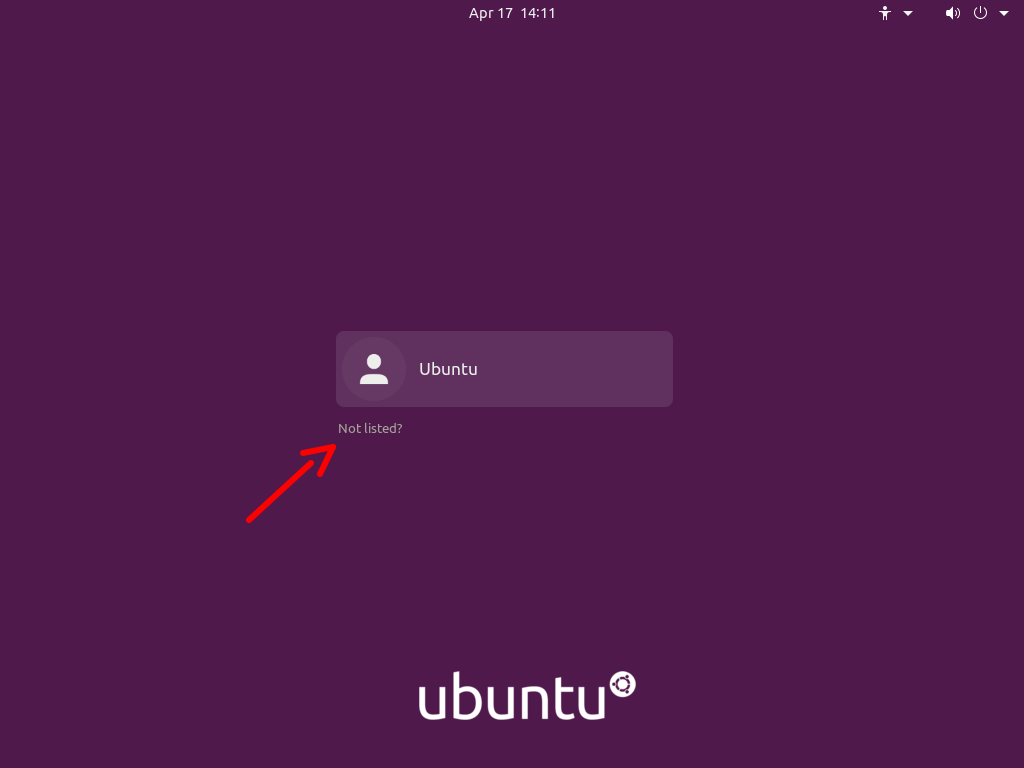
The desktop login only shows local users in the list to pick from, and that's on purpose.
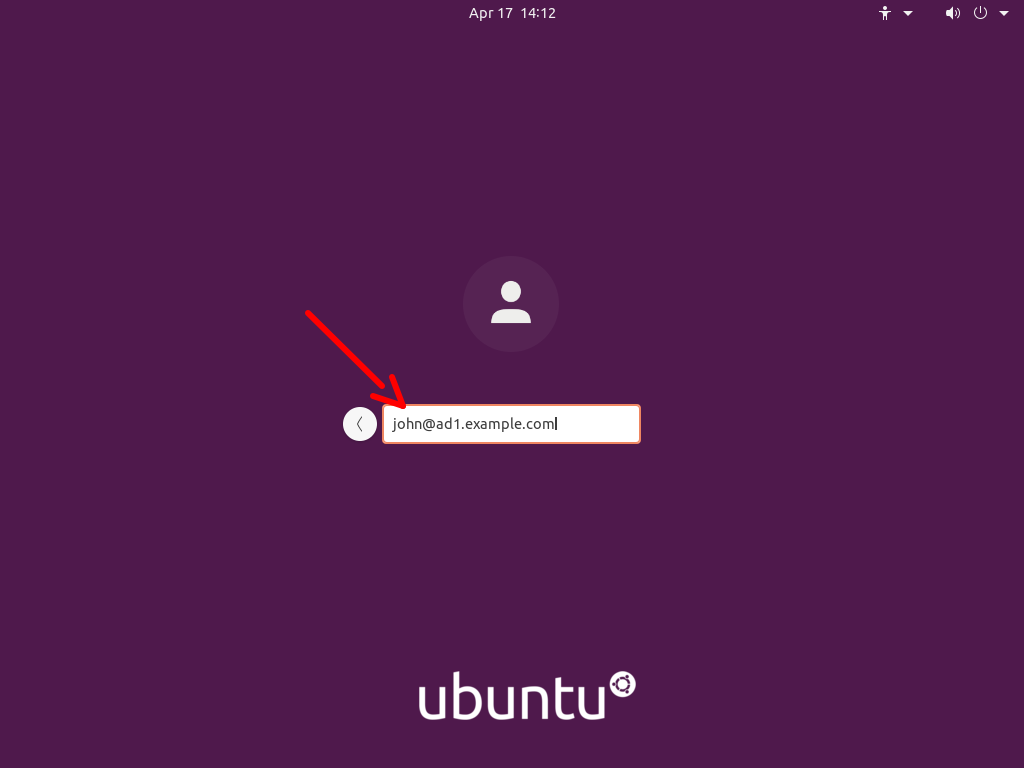
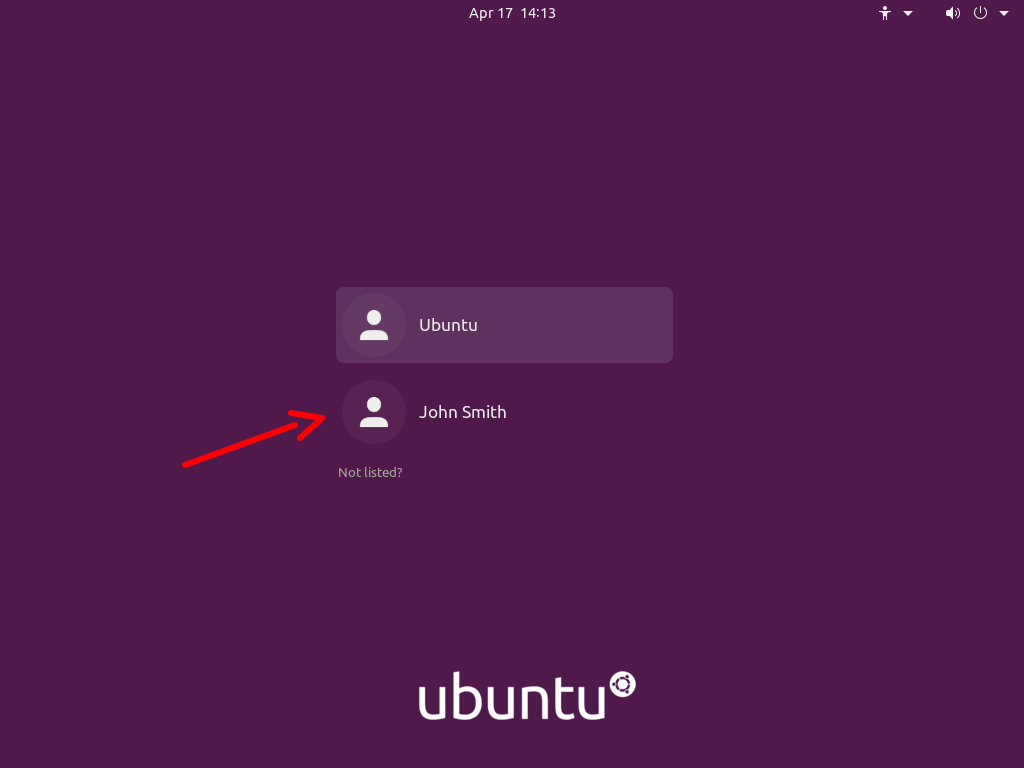
To login with an Active Directory user for the first time, follow these steps:
- Click on the "Not listed?" option:
- Type in the login name followed by the password:
- Next time you login, the AD user will be listed as if it was a local user:
## Known issues
When logging in on a system joined with an Active Directory domain, `sssd` (the package responsible for this integration) will try to apply Group Policies by default. There are cases where if a specific policy is missing, the login will be denied.
This is being tracked in {lpbug}`1934997`. Until the fix becomes available, please see comment number 5 in that bug report for existing workarounds.
## Further reading
- [GitHub SSSD Project](https://github.com/SSSD/sssd)
- [Active Directory DNS Zone Entries](https://learn.microsoft.com/en-us/previous-versions/windows/it-pro/windows-server-2003/cc759550(v=ws.10)?redirectedfrom=MSDN)